



Two annotation providers can quote you for the exact same project and land on completely different numbers. Not because one is more expensive, but because they are not measuring the same thing.
One quotes per completed task. Another quotes per image or file. A third bills by the hour. Put those three numbers side by side and you are not really comparing prices. You are comparing three different systems for measuring work, and that is why so many annotation procurement conversations stall before they reach a real decision.
The natural instinct is to chase the lowest number. But a low quote built on a pricing model that does not match how your project actually runs tends to cost more later, whether that shows up as change orders, budget overruns, or rework once quality issues surface.
Before you can compare vendors fairly, it helps to understand why these pricing models exist in the first place, and what each one is actually built to handle.
Same project, different math
No two annotation projects behave the same way
Annotation projects vary far more than most buyers expect going in. Dataset complexity changes the picture: a batch of clean product photos behaves nothing like a set of cluttered street scenes. Annotation type matters too, since a simple classification task takes a fraction of the effort of a multi-object segmentation task. Quality requirements, the amount of review needed, and how long a project is expected to run all shift the effort curve in different directions. A pricing model that works cleanly for a three-week project can fall apart over a six-month one, and vice versa.
The real question is not which model is cheapest
Because projects vary this much, no single pricing model works well for every kind of work. That is not a flaw in the market. It is the reason task-based, asset-based, and hourly pricing all exist side by side. The question worth asking is not "which model is cheapest." It is "which model best reflects how my project will actually be delivered." A model that fits your workflow will scale predictably as the project grows. One that does not fit will require constant renegotiation, no matter how attractive the headline rate looked at the start.
Task-based pricing: pay for the finish line
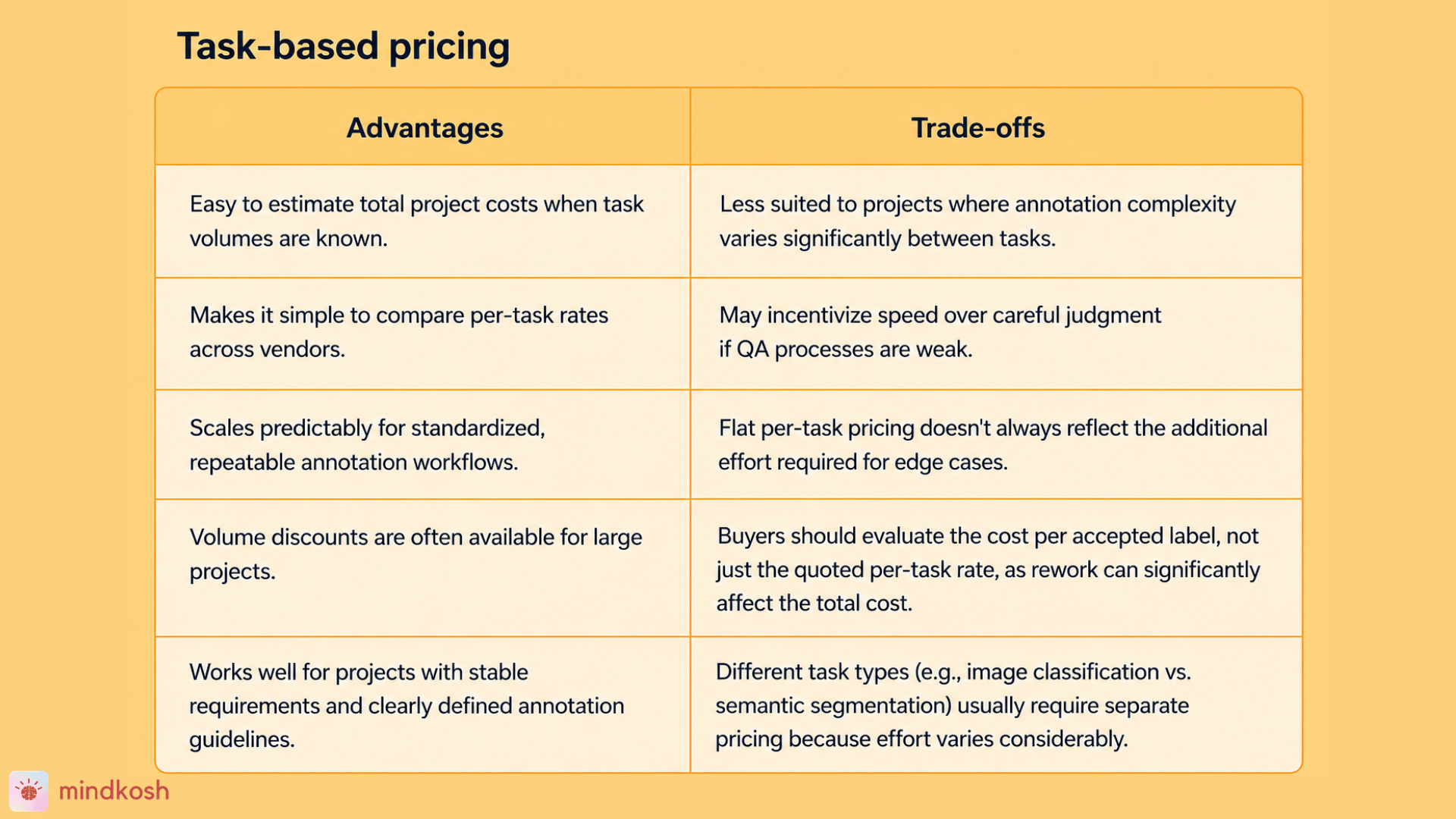
Task-based pricing charges a fixed rate for each completed annotation task, regardless of how long that task takes to finish. If a project involves 10,000 bounding box tasks at a set rate per task, the total cost is straightforward to calculate before work even begins. The unit of work, not the unit of time, is what gets priced.
Task-based pricing: benefits
- Cost scales directly with completed work, so once you know your task volume and rates, the total is straightforward to project. This is the most forecastable of the three models on a pure math basis.
- Per-label rates are easy to benchmark across vendors. Keypoint annotations typically run around $0.015 per object and NLP entities around $0.02, giving buyers a real reference point when comparing quotes. Mindkosh's cost estimator also estimates task-based rates for different annotation tasks.
- Volume tends to unlock better rates. Clarifai, for instance, offers volume-based annotation pricing discounts above 500,000 annotations, so this model rewards scale.
- Scales cleanly with demand. Adding more volume just adds more of the same priced unit, without requiring a new pricing conversation.
- Good fit for projects that need fast turnaround on well-defined, repeatable task types.
Task-based pricing: limitations
- Speed can be prioritized over care. Annotators are paid per completed unit, not per hour of careful judgment, so on ambiguous items there's pressure to submit whatever label is quickest to defend if reviewed, rather than the one that's actually most accurate. Extra time spent deliberating doesn't pay any more, so there's no built-in reward for getting the hard calls right.
- Because the rate doesn't price in quality directly, work that fails review still has to be caught and redone, and that rework cost is rarely reflected in the headline number.
- Some providers billing per label have a financial incentive to over-label, marking more objects than a task genuinely calls for, since more labels means more revenue. Clear annotation guidelines and spot-check reviews are the usual protection against this.
- AI-assisted pre-labeling is quietly reshaping this risk. When a model handles the easy, obvious labels and humans are only pulled in for the ambiguous cases, the average per-label cost looks lower, but the human work left over is concentrated in exactly the hard cases a flat per-label rate was never calibrated to price fairly on their own.
- A low quoted rate isn't automatically the cheaper option. A vendor quoting ten cents a label with a 30 percent rework rate can end up costing about the same as one quoting twelve cents with a 5 percent rework rate, once you account for the rework. The number worth comparing is cost per accepted label, not the rate on the quote. Running a short paid pilot before committing to a full contract is usually the fastest way to see that real number.
- A single blended rate rarely reflects true difficulty across task types. Semantic segmentation can take 45 to 90 minutes on a complex scene versus 2 to 4 minutes for bounding box work on the same image, so "per task" pricing still needs separate rates per task type to stay fair.
This model works best when the work itself is repeatable and well defined. Image classification, standard bounding boxes, and other high-volume, standardized annotation types are a natural fit. If your dataset is consistent and your annotation guidelines are locked in before work starts, task-based pricing gives you a clean, predictable number to plan around.
Task-based pricing rewards standardization. The moment a project starts introducing exceptions, ambiguous cases, or shifting requirements, its biggest strength, predictability, starts to work against it.
Asset-based pricing: pay by the file
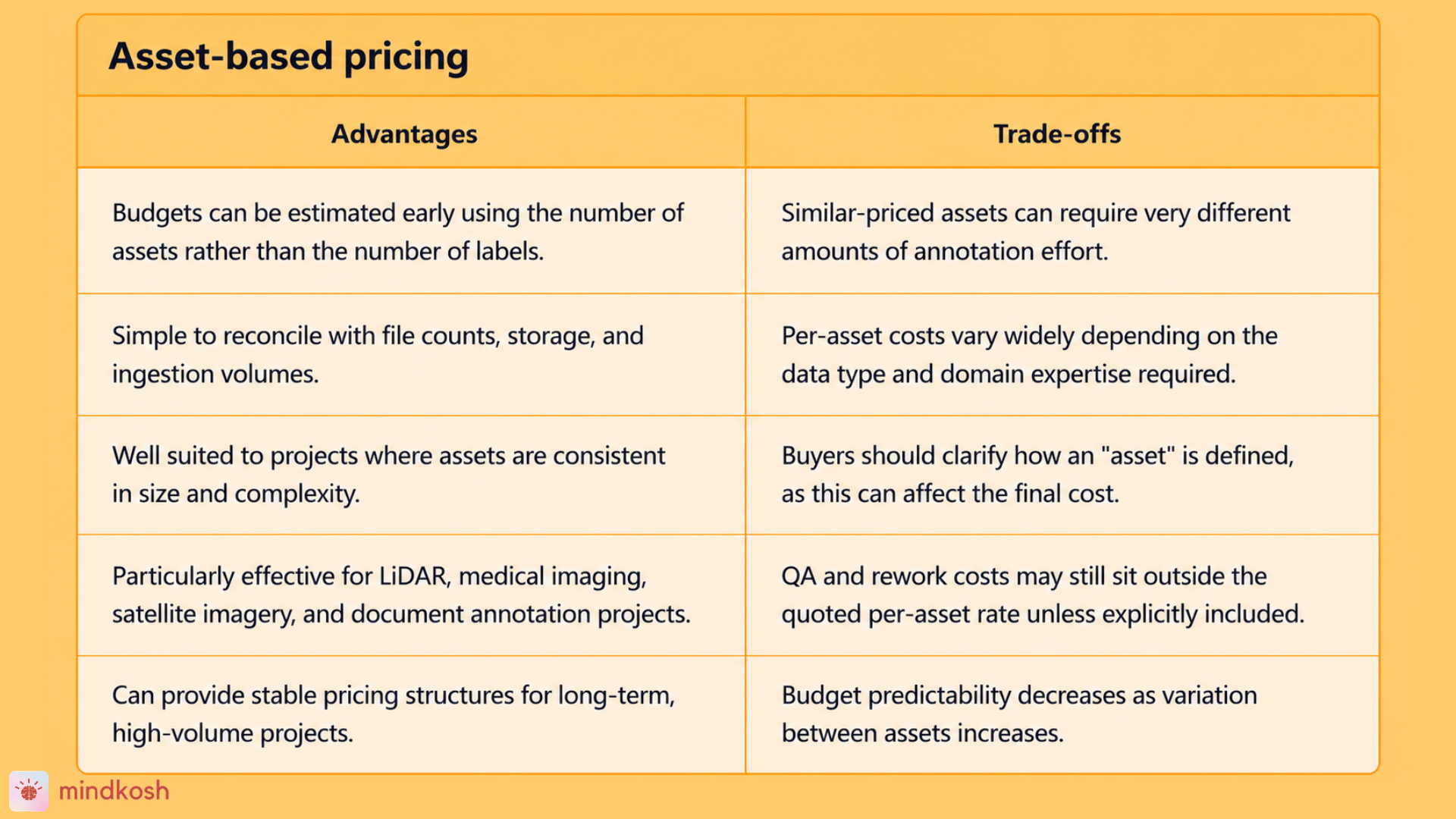
Asset-based pricing charges per file (per image, per point cloud, per document) rather than per label performed inside that file. Two files at the same rate cost the same regardless of how many boxes, polygons, or points get labeled inside them. That's the opposite of task-based pricing, where the invoice grows with every additional label. This is common in fields where a single file can carry a lot of annotation work, like medical imaging or LiDAR point clouds.
Asset-based pricing: benefits
- Budgets can be built off something you know before annotation starts, your file count, rather than something you don't, how many labels each file will actually need. That makes early quoting more certain than task-based pricing, where the real total often isn't clear until work is already underway.
- Simple to reconcile against storage and ingestion volume, since the priced unit (a file) already maps to something finance and procurement track.
- Works well when assets are genuinely comparable in scope. This model is common among data labeling tools and cloud-based services and tends to work best for large-scale projects with simple annotation tasks, where a flat rate reflects real, consistent effort.
- For dense specialist data, vendors sometimes bundle the work into one number rather than pricing each object. 3D point cloud and LiDAR annotation is often priced per scene, in the dollar to multi-dollar range, reflecting the combined depth of cuboid labeling plus per-class semantic segmentation, which can be easier to budget against than tracking every object inside a scene.
- Enterprise volume-based structures exist for exactly this model. TELUS International structures pricing on a consumption basis, with annual or multiyear contracts, which suits buyers who want a stable, ongoing rate rather than a per-project quote each time.
Asset-based pricing: limitations
- A flat per-file rate can't tell the difference between a sparse file and a dense one. Two files priced identically can require very different amounts of real annotation effort.
- Cost per asset varies enormously by data type and domain. Expert annotators for specialist domains can cost 20 to 40 times the hourly rate of generic crowd workers, which is a large part of why medical scans and LiDAR files cost far more per asset than a standard photo.
- Worth confirming exactly how "one asset" is defined in the contract before signing (whether a long video or a large point cloud file could be split into multiple billable assets, for instance), since that definition affects the real total more than the headline rate does.
- Like task-based pricing, this model can still hide rework and QA costs behind a clean-looking per-file number, so it's worth asking the same "what happens if an asset fails review" question here too.
This model tends to make the most sense when the underlying assets are consistent in size and complexity. Medical imaging, satellite imagery, LiDAR datasets, and document annotation projects often default to asset-based pricing because the "unit" buyers care about- a scan, an image, a document- is a natural way to think about scope and cost together.
Asset-based pricing is a good fit when your files are genuinely comparable to one another. It gets less reliable the moment complexity varies significantly from one asset to the next, since the pricing does not distinguish between a simple file and a dense one.
Hourly pricing: pay for the process, not the output
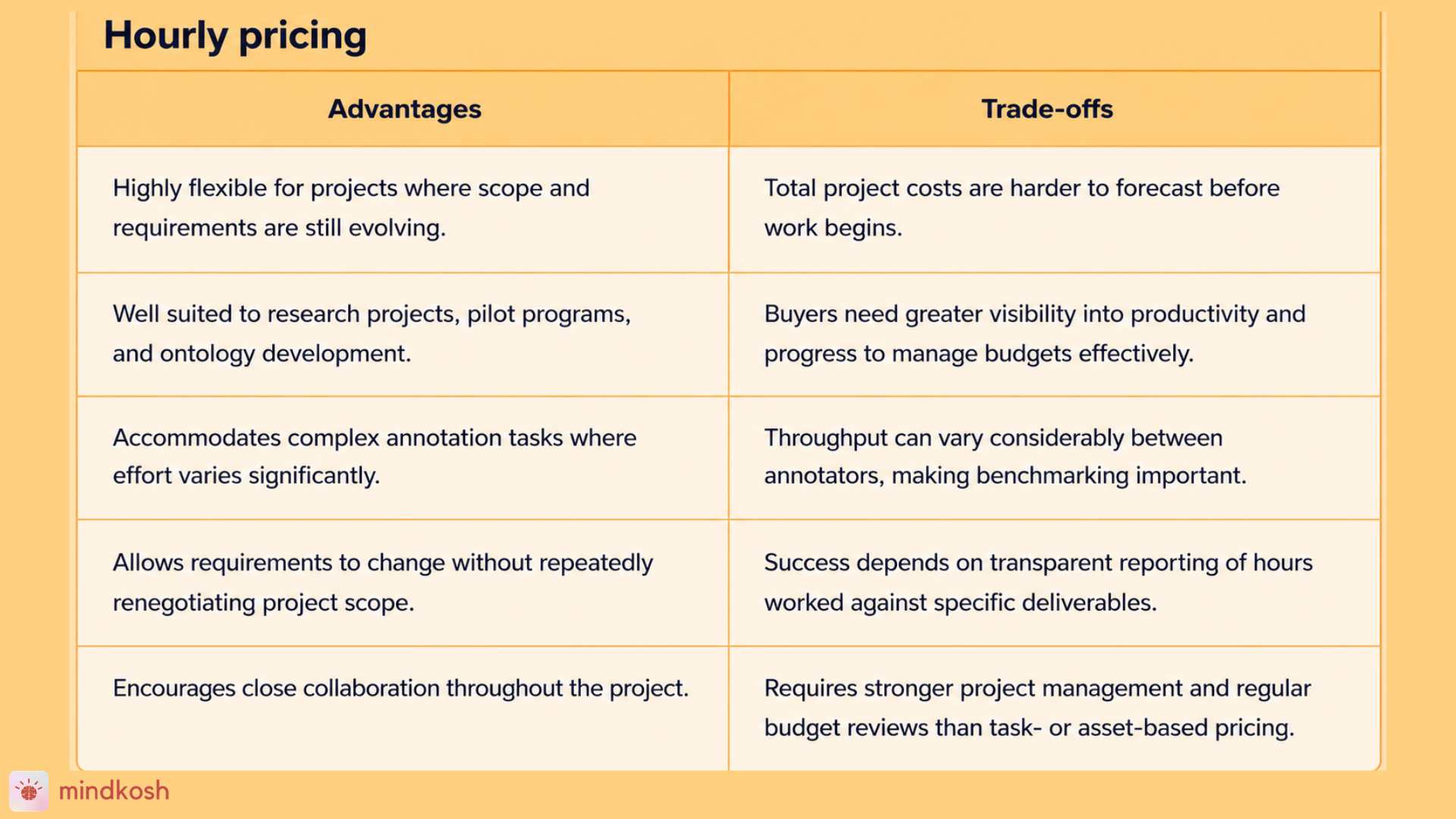
Hourly pricing bills based on labor hours spent, rather than tasks completed or assets processed. It is built for situations where the scope of work is expected to shift, where requirements are still being figured out, or where the annotation approach itself might change partway through the project.
Hourly pricing: benefits
- Fits work where time per item is genuinely unpredictable. This suits complex or evolving work such as detailed semantic segmentation, multi-step NLP, or sensor-fusion labeling, where time per item swings too much for a per-unit rate to be fair to either side.
- Well suited to early-stage projects, before the specification is fully locked, since scope can adjust without renegotiating a fixed contract every time something changes.
- The only workable model when the provider isn't the one doing the annotation. On a self-serve annotation platform, the customer's own team performs the labeling, so there's no finished output for the vendor to price, only tool access and usage. This is why the same company can reasonably run task-based pricing for delivered work and hourly or credit-based pricing for its own tooling. They're pricing two different things.
- The same logic shows up outside annotation. A Canva subscription (an hourly-style access model) makes sense when you want the freedom to build something yourself. Hiring a designer for one defined brief makes more sense priced by the task, since the deliverable is already known.
- Suits buyers who want frequent check-ins and input as work progresses, since the billing structure doesn't lock scope in place the way a fixed per-unit contract does.
Hourly pricing: limitations
- Total cost is genuinely hard to forecast upfront, since it depends on how long the work actually takes rather than a number you can multiply out in advance.
- Quality risk shifts to the buyer. If throughput is low or accuracy drops, the meter runs regardless, so buyers need to track output, not just approve invoices.
- Without a shared benchmark, hours can creep, and nobody can say whether that reflects thoroughness or just slow work. The protection is agreeing on expected units per hour from comparable past work, and reviewing that benchmark regularly.
- Forecasting requires real structure on the buyer's side too. This model requires clear scope definition, throughput tracking, and regular reporting to avoid budget overruns, not just a willingness to pay by the hour.
- Works best with vendors who report time transparently, logged against specific deliverables rather than handed over as a single lump sum at the end of a billing period.
- Buyers who want hourly work to stay efficient usually need their own productivity benchmarks in place, since the vendor has less built-in incentive to move quickly than under task-based pricing.
This model tends to work best for ontology development, evolving datasets, research-stage projects, and pilot programs, where the annotation team needs room to adapt as understanding of the data improves. If you do not yet know exactly what "done" looks like, hourly pricing gives both sides the flexibility to figure it out together without renegotiating a fixed-scope contract every time something changes.
Hourly pricing is not a worse model than task-based or asset-based pricing. It solves a different problem: variability. The trade-off is that buyers need more visibility into how hours are actually being used, which makes vendor transparency far more important under this model than under the other two.
Three models, one decision
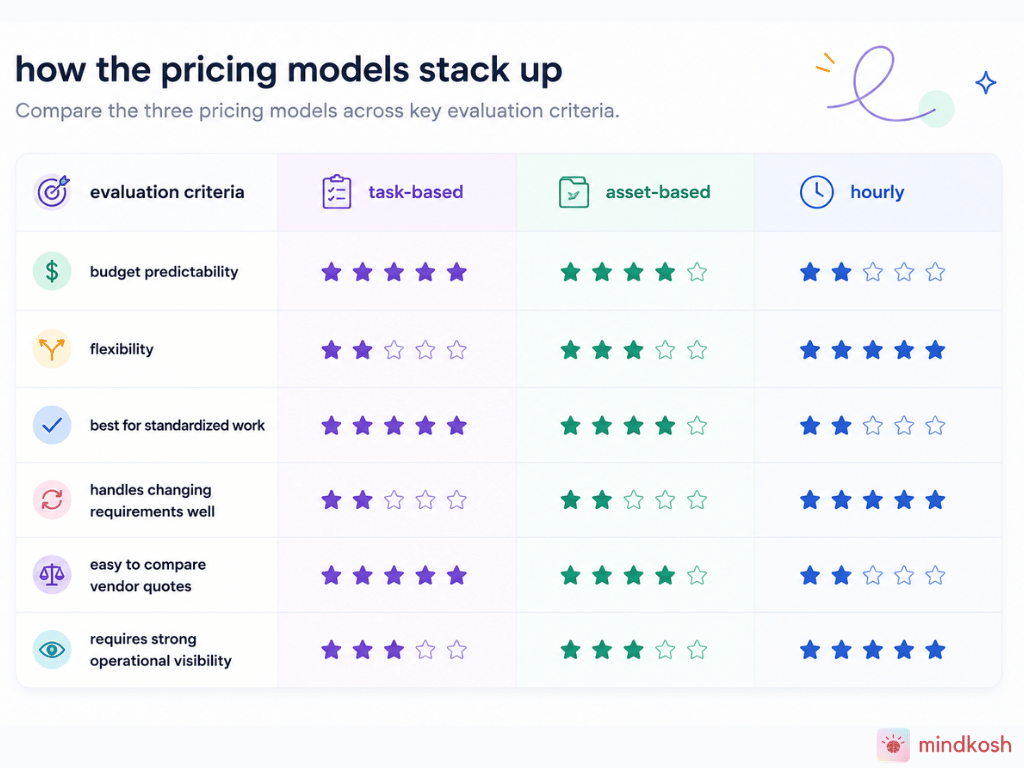
Laid side by side, the differences between these models become easier to see, and easier to match against your own project.
No model here is universally better than the others. Each one is built to solve a different operational problem, and the "right" choice depends entirely on what your project looks like, not on which rate happens to sound lowest on a proposal.
Finding your fit
Ask these questions before you sign anything
A few questions can shortcut most of the decision. How standardized is the workflow? Is the scope likely to change once work is underway? How much does annotation complexity vary from item to item within the dataset? And, honestly, do you value predictability more than flexibility for this particular project, or the other way around? The answers usually point toward one model more clearly than any side-by-side rate comparison ever could.
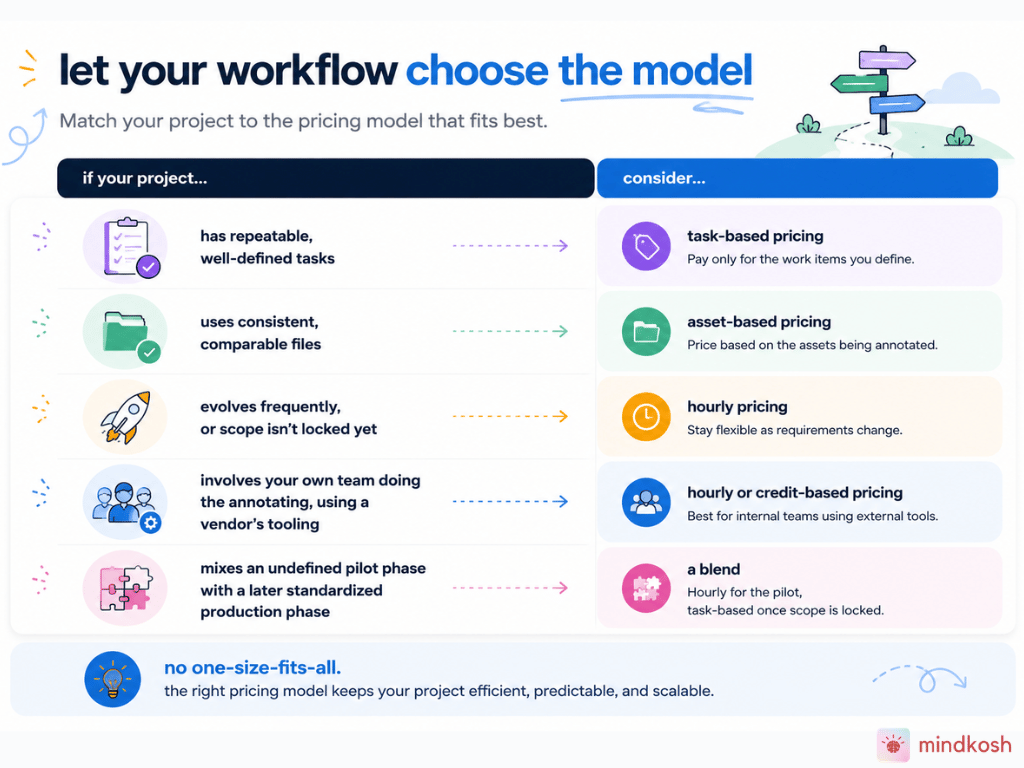
Let your workflow choose the model
Once the workflow points toward a model, the pricing conversation with any vendor gets a lot more concrete, and a lot less about chasing the lowest number on a spreadsheet.
One more thing worth checking before you request a quote
Picking the right model is only half the decision. A pricing model is only as useful as your ability to actually understand it, so it is worth checking whether a vendor explains its pricing assumptions, cost drivers, and estimation methods clearly, or leaves you to figure that out after signing. Public pricing pages, clear FAQs, and cost estimators are simple signals that a vendor wants buyers to plan with confidence rather than find out the real cost later. Mindkosh, for instance, publishes its pricing openly, maintains FAQs covering credits, storage, and enterprise plans, and offers an interactive cost estimator so teams can forecast project costs before ever talking to sales. That kind of clarity does not replace choosing the right pricing model. It just makes whichever model you choose easier to trust.
The model you can forecast is the right one
The best pricing model is not necessarily the cheapest, the simplest, or the one every vendor happens to recommend by default. It is the one that aligns with how your project actually operates, supports predictable budgeting as work progresses, and is explained clearly enough that you can estimate total costs with confidence before committing. Get the model right, and the rest of the pricing conversation gets a lot easier to trust.
Frequently asked questions
Which data annotation pricing model is cheapest?
None of the three models is inherently cheapest. Each one prices a different unit of work, so the "cheapest" option depends entirely on how well it matches your project's complexity and consistency, not on the headline rate.
Can a single project use more than one pricing model?
Yes. Larger or multi-phase projects sometimes mix models, for example using task-based pricing for a standardized production phase and hourly pricing for an earlier, still-evolving pilot phase.
Why do some annotation vendors avoid publishing pricing?
Some vendors treat pricing as a negotiation point that depends on deal size or as something that varies too much to standardize. Others simply prefer to control that conversation through sales. Either way, it is worth asking directly how they arrive at a quote.
How do I know if a vendor's pricing is transparent enough?
Look for public pricing information, clear explanations of what drives cost, FAQs covering common scenarios, and ideally a way to estimate costs before you have to talk to a sales team.
Ready to see what your project would actually cost? Explore Mindkosh's public pricing, FAQs, and interactive cost estimator to forecast your project budget before you talk to sales.